目录结构
| 文件夹 |
作用 |
| apis |
接口 |
| assets |
静态资源 |
| components |
通用组件 |
| composables |
组合函数 |
| directives |
全局指令 |
| router |
路由Router |
| stores |
Pinia仓库 |
| styles |
全局样式文件夹 |
| utils |
工具函数 |
| views |
页面级组件 |
jsconfig.json配置别名路径
1. 安装 Path Intellisense 插件
安装一个名为 Path Intellisense 的插件,它可以帮助你在输入路径时自动补全。
2. 配置 jsconfig.json 或 tsconfig.json
为了让 VSCode 能够识别 @ 作为 src 目录的别名,你需要在项目根目录下创建一个 jsconfig.json(适用于 JavaScript 项目)或 tsconfig.json(适用于 TypeScript 项目)文件。
对于 JavaScript 项目 (jsconfig.json):
1
2
3
4
5
6
7
8
9
| {
"compilerOptions": {
"baseUrl": ".",
"paths": {
"@/*": ["src/*"]
}
},
"exclude": ["node_modules"]
}
|
对于 TypeScript 项目 (tsconfig.json):
1
2
3
4
5
6
7
8
9
| {
"compilerOptions": {
"baseUrl": ".",
"paths": {
"@/*": ["src/*"]
}
},
"exclude": ["node_modules"]
}
|
3. 配置 Path Intellisense
为了让 Path Intellisense 插件能够识别 @ 别名,需要在 VSCode 的设置中进行配置。
- 打开 VSCode 的设置(
Ctrl+, 或通过菜单 文件 > 首选项 > 设置)。
- 搜索
Path Intellisense。
- 找到
Path Intellisense: Mappings,点击 编辑 in settings.json。
- 在
settings.json 中添加以下配置:
1
2
3
4
5
| {
"path-intellisense.mappings": {
"@": "${workspaceFolder}/src"
}
}
|
完成上述配置后,重启 VSCode 以确保所有配置生效。
定制elementPlus主题
安装sass
基于vite的项目默认不支持css预处理器,需要开发者单独安装
自动导入配置
这里自动导入需要深入到elementPlus的组件中,按照官方的配置文档来
- 自动导入定制化样式文件进行样式覆盖
- 按需定制主题配置 (需要安装 unplugin-element-plus)
1
2
3
4
5
6
7
8
9
10
11
12
13
14
15
16
17
18
19
20
21
22
23
24
25
26
27
28
29
30
31
32
| import { fileURLToPath, URL } from 'node:url'
import { defineConfig } from 'vite'
import vue from '@vitejs/plugin-vue'
import AutoImport from 'unplugin-auto-import/vite'
import Components from 'unplugin-vue-components/vite'
import { ElementPlusResolver } from 'unplugin-vue-components/resolvers'
export default defineConfig({
plugins: [
vue(),
AutoImport({
resolvers: [ElementPlusResolver()],
}),
Components({
resolvers: [ElementPlusResolver({importStyle: "sass"})],
}),
],
resolve: {
alias: {
'@': fileURLToPath(new URL('./src', import.meta.url))
}
},
css: {
preprocessorOptions: {
scss: {
additionalData: `
@use "@/styles/element/index.scss" as *;
`,
}
}
}
})
|
项目亮点
路由缓存问题,即路由跳转时,页面没有更新
什么是路由缓存问题:使用带有参数的路由时需要注意的是,当用户从/users/johnny 导航到/users/jolyne 时,相同的组件实例将被重复使用。因为两个路由都渲染同个组件,比起销毁再创建,复用则显得更加高效。不过,这也意味着组件的生命周期钩子不会被调用。
问题:一级分类的切换正好满足上面的条件,组件实例复用,导致分类数据无法更新
解决问题的思路:
- 让组件实例不复用,强制销毁重建 。
给router-view添加key属性
- 监听路由变化,变化之后执行数据更新操作。
当router更新时重新发送页面请求 onBeforeRouteUpdate((to)=>{getNavList(to.params.id)})
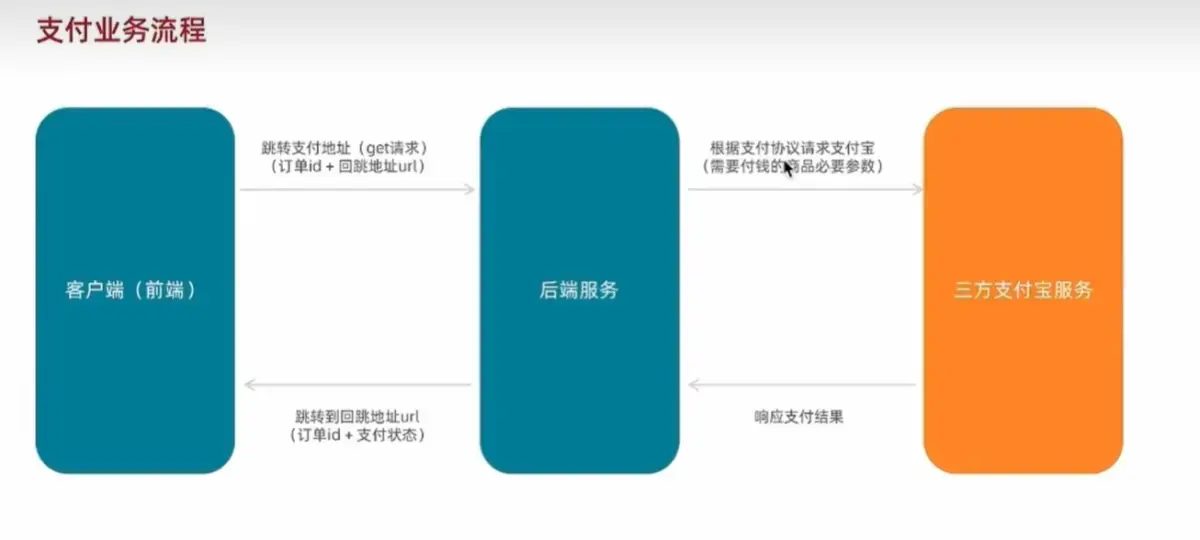
支付业务流程
定制路由滚动行为
当切换路由时,页面自动滚动到顶部,在router文件中进行配置
1
2
3
4
5
6
7
8
9
10
| const router = createRouter({
history: createWebHistory(import.meta.env.BASE_URL),
routes: [],
scrollBehavior(){
return {
top:0
}
}
})
|
在路由页面,使用导航守卫,配置路由跳转前后的行为
主要实现以下几点:
1、配置页面跳转的loading动效
2、切换路由时自动滚回页面顶部
3、没有登录时,在地址栏输入url,不能直接跳转到相对应的页面
4、页面标题随着meta进行变化
1
2
3
4
5
6
7
8
9
10
11
12
13
14
15
16
17
18
19
| import { ElLoading } from 'element-plus'
import 'element-plus/theme-chalk/el-loading.css'
router.beforeEach((to,from,next)=>{
ElLoading.service({
fullscreen: true,
text: 'Loading...'
})
window.scrollTo(0,0)
next()
})
router.afterEach((to)=>{
setTimeout(()=>{
const loadingInstance = ElLoading.service()
loadingInstance.close()
},1000)
document.title = to.meta.title || 'my project'
})
|